0 ratings


№ на артикул:
69355953
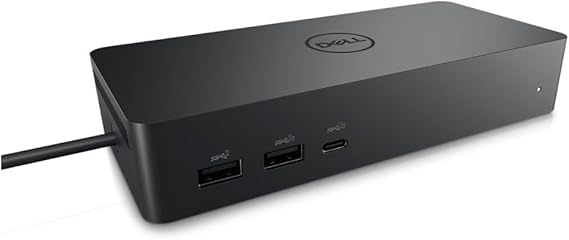
Dell Universal Dock UD22, USB-C docking station with 130W power adapter, 96W power delivery, 10 ports, HDMI, DisplayPort, dual monitor support, black
90% of respondents would recommend this to a friend
№ на артикул:
69355953
€ 207
Price Details
Excluding Shipping & Custom charges ( Shipping and custom charges will be calculated on checkout )
*All items will import from САЩ
0 ratings
Напишете отзив
В наличност
 Импортирани от магазин USA
QTY:
Поръчайте сега и я вземете Monday, Ноември 09
Secured transaction
Ubuy works hard to protect your security and privacy. Our advanced payment security system ensures confidentiality by encrypting your information during transmission using AES (Advanced Encryption Standards) and SSL (Secure Socket Layer) protocols. Your payment details are 100% secure as we do not share your payment details with third party sellers.
Our Top Logistics Partners


Fast
Shipping

Free
Return*

Secure Packaging

100% Original Products

PCI DSS Compliance

ISO 27001 Certified



Note: Step Down Voltage Transformer required for using electronics products of САЩ store (110 V-120 V). Recommended power converters Купи сега.


What Stands Out
Versatile Connectivity
The Dell Universal Dock UD22 supports multiple device connections, offering HDMI, USB-C, and Ethernet ports, enabling seamless integration with various laptops and peripherals for enhanced productivity.
High-Resolution Support
This dock provides dual 4K display capabilities, ensuring high-resolution performance for graphic-intensive tasks, ideal for professional users seeking superior visual experiences without compromising on speed.
Compact Design
The sleek and compact form factor of the UD22 ensures efficient desk space usage, appealing to users in home offices or collaborative workspaces who value aesthetics alongside functionality.
Информация за продукта
| Hardware Interface | HDMI, USB 3.0 Type A |
| Compatible Devices | Monitors |
| Total Usb Ports | 6 |
| Number of Ports | 10 |
| Total Number of HDMI Ports | 1 |
| Wattage | 130 |
| Item Dimensions L x W x H | 6.54"L x 1.26"W x 2.99"H (16.6 x 3.2 x 7.6 cm) |
| Item Weight | 14.7 ounces (416.75 grams) |
| Color | Black |
| Brand | Dell |
| Number of Items | 1 |
| Number of Packs | 1 |
| Unit Count | 1 Count |
| UPC | 884116431442 |
| Manufacturer | Dell Computers |
| Built-In Media | Item |
| Model Number | Dell-UD22 |
| Mfr Part Number | 210-BEXR |
| Total USB Ports | 6 |
| Product Dimensions (L x W x H) | 6.54"L x 1.26"W x 2.99"H (16.6 x 3.2 x 7.6 cm) |
| Total HDMI Ports | 1 |
Who Should Buy?

-
Remote Workers
Ideal for remote workers needing multiple connections for monitors and peripherals, enhancing productivity and workspace organization.
-
Gamers
Great for gamers who require multiple display options and peripheral connectivity for an immersive gaming experience.
-
Content Creators
Perfect for content creators who need to connect various devices and displays for multitasking during editing and production.

-
Minimalists
Not suitable for users who prefer a minimal setup, as it adds multiple connections and devices to their workspace.
ОПИСАНИЕ НА ПРОДУКТА
Dell Universal Dock UD22, USB-C docking station with 130W power adapter, 96W power delivery, 10 ports, HDMI, DisplayPort, dual monitor support, black
Имате запитване? Чат с нас
Въпроси и отговори на клиенти
-
въпрос:
Как да пазарувате Dell Universal Dock UD22, USB-C docking station with онлайн от Ubuy?
отговор: Лесно е да пазарувате Dell Universal Dock UD22, USB-C docking station with онлайн от Ubuy.. Просто трябва да потърсите продукта, да изберете метода си за доставка, докато плащате, и да го достави до вашето местоположение. -
въпрос:
Dell Universal Dock UD22, USB-C docking station with предлага ли се за пазаруване онлайн в Bulgaria?
отговор: Да, в Ubuy Bulgaria този продукт е наличен, за да пазарувате на разумна цена.. Dell Universal Dock UD22, USB-C docking station with не се предлага на местно ниво, но можете да ни се доверите с нашите услуги за експресна доставка. -
въпрос:
Колко време отнема получаването на продукта след извършване на поръчката?
отговор: Времето за доставка на поръчания от вас продукт варира в зависимост от това, което сте поръчали, и избрания от вас метод на доставка.. Очакваното време за доставка се споменава по време на процеса на плащане, така че бъдете безгрижни, докато пазарувате.
Dell Docking Stations Dell-UD22 Editorial Review
Dell DELL-UD22 UD22 Universal Dock, Black is an essential accessory for modern laptops with limited ports, providing an array of connectivity options including HDMI, USB-C, and RJ-45 gigabit ports. Users have praised its ability to connect multiple computers seamlessly to monitors, showcasing its versatility for both Windows PCs and MacBook systems. The dock's impressive power delivery capability, offering up to 96W via USB-C, further enhances its utility in professional and home environments. Although some users mentioned intermittent connectivity issues with peripherals like mice and speakers, the overall consensus is that this dock offers a practical solution to expand connectivity and efficiency.
Customer Reviews & Ratings
1 оценки от клиенти
-
5 звезда
100%
-
4 звезда
0%
-
3 звезда
0%
-
2 звезда
0%
-
1 звезда
0%
Дайте отзив за този продукт
Споделете вашите мисли с други клиенти
Професионалисти
- Multiple connectivity options including HDMI and USB-C ports
- Seamless connection for dual computer setups
- Provides adequate power delivery for laptops
- Compact design fits easily into any workspace
- Durable build quality ensures longevity
Platform Trust & Buyer Confidence

BS
Beat
Verified buyer
“Simple process, tax and import duties announced by email. Paid online. Delivery was quick. Can recommend.”
22 October 2026 · via Trustpilot
S
Songpon
Verified buyer
“The product met my expectations perfectly. The ordering process was convenient and easy, and I was kept updated on the delivery status throughout the shipping process. The delivery was also very fast. I can confidently confirm that Ubuy provides an excellent shopping and delivery experience. Highly recommended! From Thailand”
22 October 2026 · via Trustpilot
D
Dimitra
Verified buyer
“Quick and efficient delivery and the possibility to get the package delivered from a pick-up point. I'm very happy with my experience and would recommend it again!”
22 October 2026 · via Trustpilot
HJ
Heer
Verified buyer
“My product came in good condition from the USA. I was happy that I could buy via this Chanel and that DHL brought it to my house. The communication is fine. The charger works very well. Fast and my Samsung watch and Samsung airbuds and Samsung Fold 8 Ultra all charge fast.”
22 October 2026 · via Trustpilot
SF
Sergey
Verified buyer
“Hello Ubuy team, thank you so much for the excellent service! I received the package today; it arrived in great condition and was packed very neatly. The delivery was fast, and the courier was very friendly as well. Wishing continued success to Ubuy and the entire team!”
23 October 2026 · via Trustpilot
WHY SHOP WITH US
Защитено плащане
Global Delivery
Easy Returns
Genuine Products
Product Price History
Важна информация
- Ограничения: За продукти, доставени в международен план, имайте предвид, че е възможно не всяка гаранция на производителя да е валидна; опциите за обслужване на производителя може да не са налични; ръководствата на продукта, инструкциите и предупрежденията за безопасност може да не са на езиците на държавата на местоназначение; продуктите (и придружаващите ги материали) може да не са проектирани в съответствие със стандартите, спецификациите и изискванията за етикетиране на страната по местоназначение; също така продуктите може да не отговарят на напрежението в държавата по местоназначение и на други електрически стандарти (изискващи използване на адаптер или преобразувател, ако е необходимо). Получателят е длъжен да гарантира, че продуктът може да бъде внесен законно в страната по местоназначение. Когато поръчвате от Ubuy или неговите партньори, получателят е вносител и трябва да спазва всички закони и разпоредби на страната по местоназначение.
- Не всички продукти, изброени в Ubuy, се продават, тъй като Ubuy е глобална търсачка. Продуктите са предмет на разпоредбите за износ/търговия.
€ 207
Поръчайте сега и я вземете Monday, Ноември 09
This item is not restrict in my country.(Please click on above link if this item is not restrict in your country, So our team will review and allow.)
QTY:
Secured transaction
PCI DSS compliant and ISO 27001:2022 certified, with encrypted payments and full buyer protection on every order.
Our Top Logistics Partners
Fastest cross-border delivery
Ubuy Assurance
Experience worry-free shopping with 100% original products, PCI DSS-compliant payment security, ISO 27001-certified data protection, the fastest cross-border delivery, free returns *, and secure packaging on every order.