0 ratings


№ на артикул:
220515945
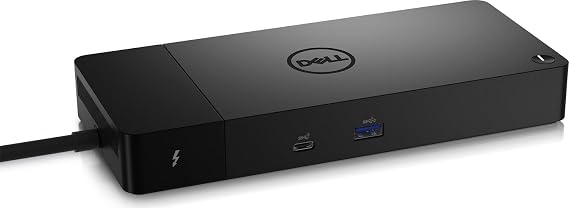
Dell ThunderBolt 4 Dock (WD22TB4), Black
78% of respondents would recommend this to a friend
№ на артикул:
220515945
€ 191
Price Details
Excluding Shipping & Custom charges ( Shipping and custom charges will be calculated on checkout )
*All items will import from САЩ
0 ratings
Напишете отзив
В наличност
 Импортирани от магазин USA
QTY:
Поръчайте сега и я вземете Четвъртък, Сeптември 24
Secured transaction
Ubuy works hard to protect your security and privacy. Our advanced payment security system ensures confidentiality by encrypting your information during transmission using AES (Advanced Encryption Standards) and SSL (Secure Socket Layer) protocols. Your payment details are 100% secure as we do not share your payment details with third party sellers.
Our Top Logistics Partners


Multiply Productivity: Connect displays and peripherals to your system with a single cable for ultimate productivity.

Fast
Shipping

Free
Return*

Secure Packaging

100% Original Products

PCI DSS Compliance

ISO 27001 Certified



Note: Step Down Voltage Transformer required for using electronics products of САЩ store (110-120). Recommended power converters Купи сега.


What Stands Out
Versatile Connectivity
The Dell ThunderBolt 4 Dock WD22TB4 offers multiple ports including USB-C, USB-A, HDMI, and Ethernet, ensuring seamless connectivity to a variety of devices for home or office use.
High-Speed Data Transfer
With Thunderbolt 4 technology, this dock enables data transfer speeds of up to 40 Gbps, allowing users to quickly transfer large files and enhance productivity without lag.
Dual 4K Display Support
Supports dual 4K displays, enabling an expansive workspace for multitasking and improved efficiency, making it ideal for graphic designers, video editors, and professionals needing high-resolution output.
Информация за продукта
| Package Weight | 4.34 Pound |
Who Should Buy?

-
Remote Workers
Ideal for remote workers needing multiple connectivity options for laptops, enhancing productivity and workspace organization.
-
Content Creators
Great for video editors and graphic designers requiring high data transfer speeds and multiple display support.
-
Gamers
Designed for gamers using laptops, offering fast data transfer and multiple peripherals support for an enhanced gaming experience.

-
Casual Users
Not suitable for casual users needing only basic connectivity, as features may be excessive for their requirements.
ОПИСАНИЕ НА ПРОДУКТА
Dell ThunderBolt 4 Dock (WD22TB4), Black
Имате запитване? Чат с нас
Въпроси и отговори на клиенти
-
въпрос:
Как да пазарувате Dell ThunderBolt 4 Dock (WD22TB4), Black онлайн от Ubuy?
отговор: Лесно е да пазарувате Dell ThunderBolt 4 Dock (WD22TB4), Black онлайн от Ubuy.. Просто трябва да потърсите продукта, да изберете метода си за доставка, докато плащате, и да го достави до вашето местоположение. -
въпрос:
Dell ThunderBolt 4 Dock (WD22TB4), Black предлага ли се за пазаруване онлайн в Bulgaria?
отговор: Да, в Ubuy Bulgaria този продукт е наличен, за да пазарувате на разумна цена.. Dell ThunderBolt 4 Dock (WD22TB4), Black не се предлага на местно ниво, но можете да ни се доверите с нашите услуги за експресна доставка. -
въпрос:
Колко време отнема получаването на продукта след извършване на поръчката?
отговор: Времето за доставка на поръчания от вас продукт варира в зависимост от това, което сте поръчали, и избрания от вас метод на доставка.. Очакваното време за доставка се споменава по време на процеса на плащане, така че бъдете безгрижни, докато пазарувате.
Dell Docking Stations Editorial Review
Dell ThunderBolt 4 Dock (WD22TB4), Black is tailored for Dell, HDMI, Thunderbolt, and USB C compatibility, making it an efficient connection hub for modern setups. Users have reported it functioning seamlessly with dual monitors and providing swift laptop charging. However, some buyers have raised concerns over connectivity issues with Ethernet and audio devices, which can often be resolved with a simple reboot while connected. The dock's limited USB-A ports may also frustrate users with multiple peripherals, necessitating additional adapters. Overall, this docking station is most effective within the Dell ecosystem, providing excellent performance when appropriately configured.
Customer Reviews & Ratings
1 оценки от клиенти
-
5 звезда
100%
-
4 звезда
0%
-
3 звезда
0%
-
2 звезда
0%
-
1 звезда
0%
Дайте отзив за този продукт
Споделете вашите мисли с други клиенти
Професионалисти
- Works well with dual monitor setups
- Fast charging capabilities
- Supports Thunderbolt 4 connections
- Compact design fits various spaces
- Reliable for Dell laptops
минуси
- Limited USB-A ports for multiple devices
Product Price History
Важна информация
- Ограничения: За продукти, доставени в международен план, имайте предвид, че е възможно не всяка гаранция на производителя да е валидна; опциите за обслужване на производителя може да не са налични; ръководствата на продукта, инструкциите и предупрежденията за безопасност може да не са на езиците на държавата на местоназначение; продуктите (и придружаващите ги материали) може да не са проектирани в съответствие със стандартите, спецификациите и изискванията за етикетиране на страната по местоназначение; също така продуктите може да не отговарят на напрежението в държавата по местоназначение и на други електрически стандарти (изискващи използване на адаптер или преобразувател, ако е необходимо). Получателят е длъжен да гарантира, че продуктът може да бъде внесен законно в страната по местоназначение. Когато поръчвате от Ubuy или неговите партньори, получателят е вносител и трябва да спазва всички закони и разпоредби на страната по местоназначение.
- Не всички продукти, изброени в Ubuy, се продават, тъй като Ubuy е глобална търсачка. Продуктите са предмет на разпоредбите за износ/търговия.
€ 191
Поръчайте сега и я вземете Четвъртък, Сeптември 24
This item is not restrict in my country.(Please click on above link if this item is not restrict in your country, So our team will review and allow.)
QTY:
Secured transaction
PCI DSS compliant and ISO 27001:2022 certified, with encrypted payments and full buyer protection on every order.
Our Top Logistics Partners
Fastest cross-border delivery
Характеристики и предимства
- Modular design for easy upgrades with swappable modules.
- Features 2 x Thunderbolt-4 ports for high connectivity.
- Fast charging technology with SuperBoost capabilities.
- Supports multiple 4K displays and Thunderbolt peripherals.
- Data transfer speeds up to 40 GB/s for maximum efficiency.
- Compatible with Windows 10 and Windows 11 systems.
Ubuy Assurance
Experience worry-free shopping with 100% original products, PCI DSS-compliant payment security, ISO 27001-certified data protection, the fastest cross-border delivery, free returns *, and secure packaging on every order.